
Table of Contents
Switch from Manual Mode to Auto Mode #
Press and hold the Mode Switch Button for a few seconds. Once the Mode Indicators on the Robot Stick start blinking, press the +/- buttons on the Robot Stick in this order: “+ – + + –” to change to Auto mode.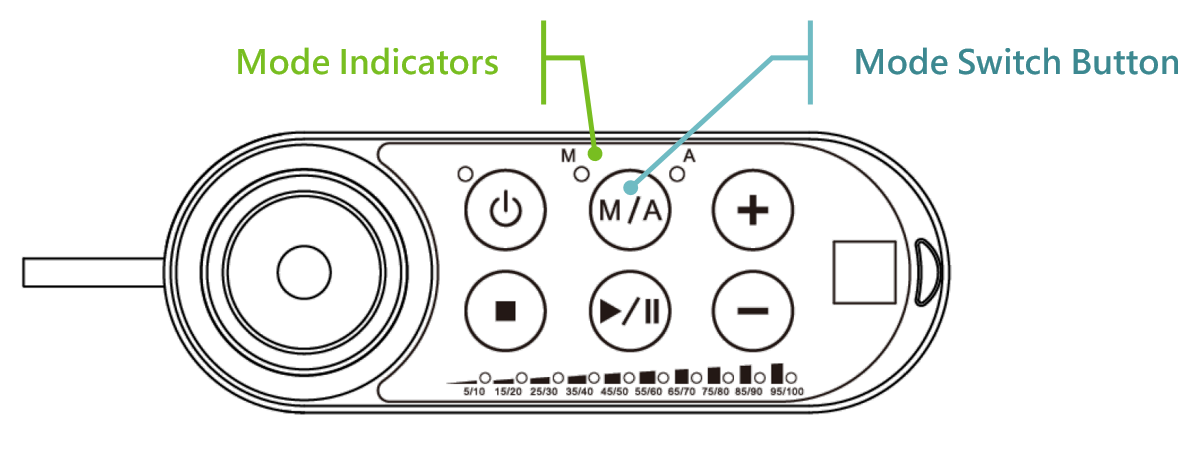
Go to the pages of View, Run Setting, or Connect to press and hold the M/A Mode Button and press the +/- buttons on the Robot Stick in this order: “+ – + + -” to change to Auto mode. The robot will stay still in Auto mode until you press the play button on the robot stick.
Switch from Auto Mode to Manual Mode #
Simply press the Mode Switch Button.
Conditions where switch modes are not allowed #
Switching between Auto mode and Manual mode is prohibited/rejected by the system under these conditions:
- The project is running in Auto Mode.
- The project is running in Manual High-Speed Mode.
- The robot is in Hand Guide Mode.
- SF15 Enabling Device is triggered (Enabling Device is continuously held in middle position) in Manual Mode.
- A Cat. 0 or Cat. 1 stop is in effect.


