如何在 TMflow 2.22 中使用即時遠端控制 (Real-Time Remote Control) - RTRS
更新日期 2026 / 10 / 01
此功能適用於:
TMflow 軟體版本:2.22 或以上
TM Robot 硬體版本:HW 5.0 或以上
功能目的
• 提供將資料即時串流至客戶端的功能
• 提供即時控制機器人的功能
即時遠端伺服器 (RTRS) 功能
• 運動控制:位置控制、速度控制
• 輸出控制:類比與數位輸出
• 資料交換:機器人狀態、類比與數位輸入
• 頻率:運動或輸出控制最高可達 500Hz,資料交換頻率 50Hz ~ 500Hz
• 通訊方式:TCP/IP
使用方式
- 設定 Real-Time Remote Server (RTRS)
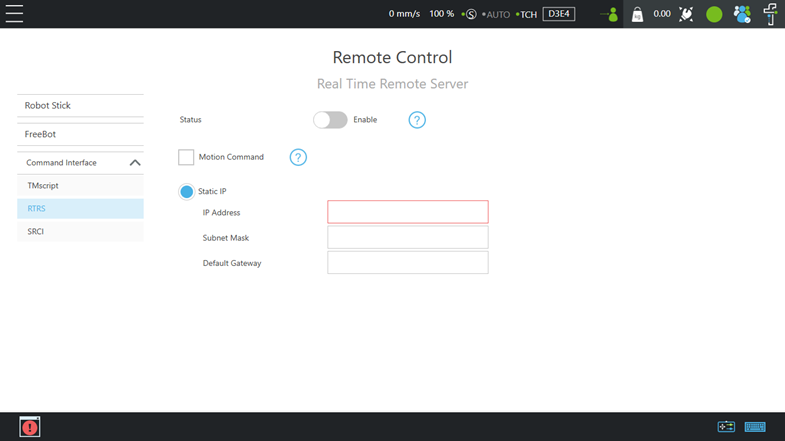
要使用 RTRS,需要先在 TMflow 介面中設定網路。
IP& RTRS settings: TMflow→Configuration→Remote Control Settings→RTRS
Port: 5895(data exchange), 5896(motion control)
可設定選項:Enable RTRS、Enable Motion Command、IP Settings
2. 連線與啟動
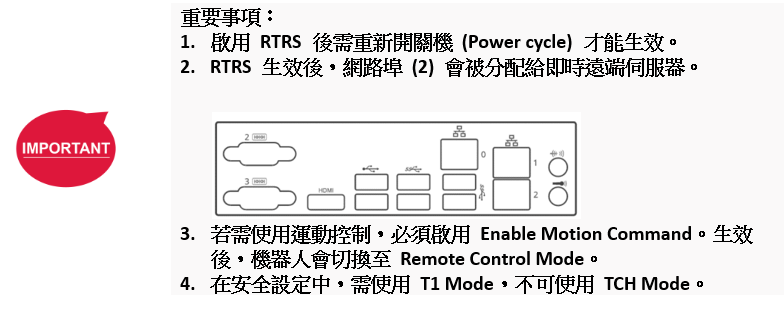
當 RTRS 生效且啟用 Motion Command 後,機器人將進入 Remote Control Mode
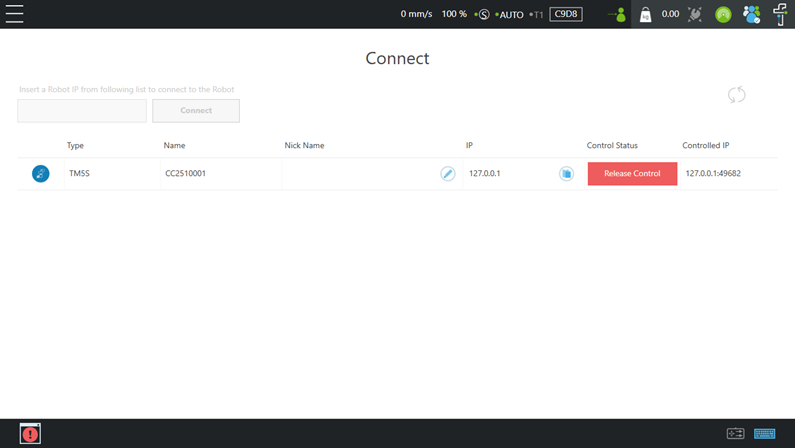
資料交換流程 :
- 啟用 RTRS
- 以 IP 連線至埠號 5895
- 設定串流頻率與資料項目
Data packet example:
$TMRTS,8,2,8,50,*58\r\n (Set streaming frequency to 50Hz)
$TMRTS,17,1,9,Joint_Angle,*2D\r\n (Set Joint_Angle as streaming data) - 啟動資料串流
Data packet example:
$TMRTS,5,2,7,1,*61\r\n (Start data streaming) 如需傳送資料或 AO/DO 寫入指令,請下指令
Data packet example:
$TMRTS,41,1,1,Ctrl_DO2=1 Ctrl_AO0=1,*D9\r\n (Set value to Ctrl_DO2 and Ctrl_AO0)
機器人控制流程 :
1. 啟用 RTRS 與 Motion Command
2. 設定資料交換以獲取機器人狀態
3. 以 IP 連線至埠號 5896
4. 設定運動控制參數
Data packet example:
$TMRTC,18,5,8,S J 150 1 1000,*AF\r\n (Set the motion control to position mode and joint mode, with a time to top speed of 150ms, a gain of 1, and a control interval of 1000ms.)5. 確保機器人未處於「暫停 (PAUSE)」或「停止 (STOP)」狀態
基於安全考量,當 RTRS(即時機器人通訊/傳輸服務)生效時,機器人將進入「暫停 (PAUSE)」狀態。在此情況下,機器人無法透過外部指令進行控制。請使用 PLAY功能來讓機器人恢復可控制狀態。
6. 啟動運動控制
Data packet example:
$TMRTC,5,8,7,1,*7B\r\n (Start motion control)
7. 傳送運動指令
Data packet example:
$TMRTC,28,0,1, { 10.8587, -148.9658, 45.7319, 143.9948, 18.7473, 33.8587},*7B\r\n (Set the control target to the following joint angles: J1 at 10.8587°, J2 at -148.9658°, J3 at 45.7319°, J4 at 143.9948°, J5 at 18.7473°, and J6 at 33.8587°)


這篇文章對您有幫助嗎?