How to Use Real-Time Remote Control in TMflow 2.22?
更新日 2026 / 03 / 03
This function is valid for :
TMflow Software version : 2.22 or above
TM Robot Hardware version : HW 5.0 or above
Other specific requirements: None
Note that older or newer software versions may have different results.
Purpose
- Provides the function to stream data to client in real-time
- Provides the function to control robot in real-time
Functions of Real-Time Remote Server
Motion control: Position control and velocity control.
Output control: Analog and digital outputs
Data exchange: Robot state, analog and digital inputs
Frequency: Up to 500Hz for motion or output control, and 50Hz to 500Hz for data exchange.
Communication: TCP/IP
How to use
- Configure Real-Time Remote Server (RTRS)
To use the RTRS, you need to configure the network settings in the TMflow interface.
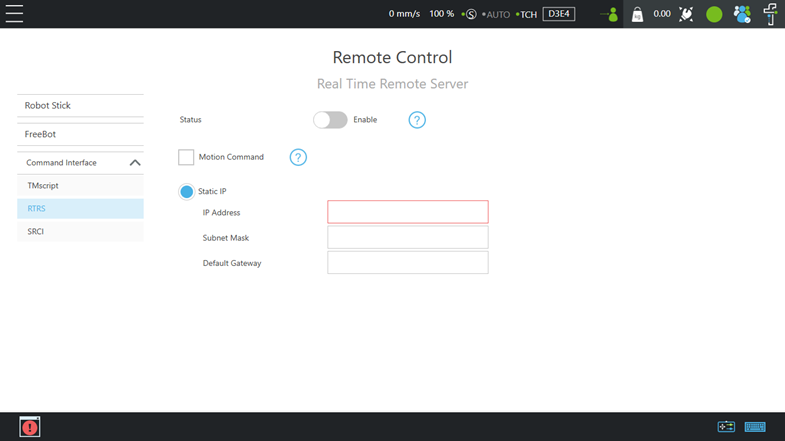
IP& RTRS settings: TMflow→Configuration→Remote Control Settings→RTRS
Port: 5895(data exchange), 5896(motion control)
Three settings can be configured on this page: Enable RTRS, Enable Motion Command, and IP Settings.
2. Connect and Start
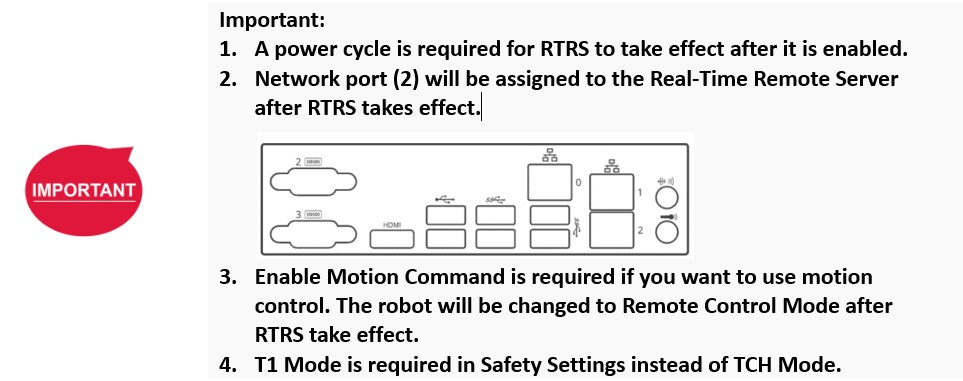
When RTRS takes effect and Motion Command is enabled, the robot will be in Remote Control Mode.
Steps to use data exchange:
Enable RTRS
Connect IP with port 5895
Set streaming frequency and data
Data packet example:$TMRTS,8,2,8,50,*58\r\n (Set streaming frequency to 50Hz)
$TMRTS,17,1,9,Joint_Angle,*2D\r\n (Set Joint_Angle as streaming data)
Start data streaming
Data packet example:$TMRTS,5,2,7,1,*61\r\n (Start data streaming)
Send data or AO/DO write command if needed
Data packet example:$TMRTS,41,1,1,Ctrl_DO2=1 Ctrl_AO0=1,*D9\r\n (Set value to Ctrl_DO2 and Ctrl_AO0)

Steps to use robot control
Enable RTRS and Motion Command
Set up data exchange to get the robot's state
Connect IP with port 5896
Set motion control settings
Data packet example:$TMRTC,18,5,8,S J 150 1 1000,*AF\r\n (Set the motion control to position mode and joint mode, with a time to top speed of 150ms, a gain of 1, and a control interval of 1000ms.)
Start motion control
Data packet example:$TMRTC,5,8,7,1,*7B\r\n (Start motion control)
Send motion command
Data packet example:$TMRTC,28,0,1, { 10.8587, -148.9658, 45.7319, 143.9948, 18.7473, 33.8587},*7B\r\n (Set the control target to the following joint angles: J1 at 10.8587°, J2 at -148.9658°, J3 at 45.7319°, J4 at 143.9948°, J5 at 18.7473°, and J6 at 33.8587°)

この記事は役に立ちましたか?