How to improve CT in vision pick and place project?
Updated on 2026 / 08 / 27
Examples are valid for:
TMflow Software version: all versions
TM Robot Hardware version: All versions.
Other specific requirements: None
Note that older or newer software versions may have different results.
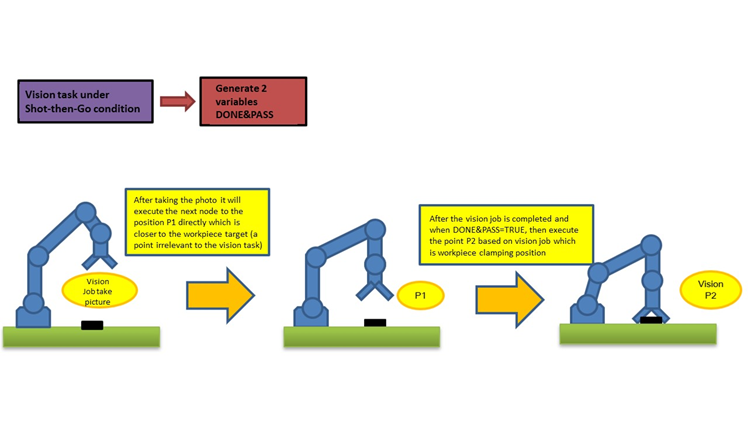
Shot then Go
Currently, only fixed-point positioning and partial AOI (Area of Interest) functionality are supported.
Shot then Go enables the robot to proceed to the next node directly after take a picture for the vision job, once the vision job computation has been successfully completed, the robot will execute the next task within the vison base . This approach effectively reduces the waiting time after take a picture for the vision job.
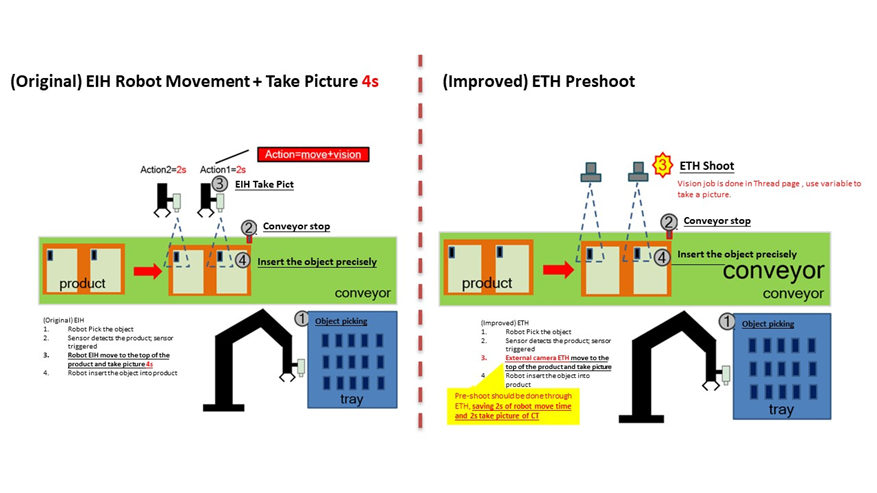
Save the Vision Base to Reduce the Number of Pictures Taken
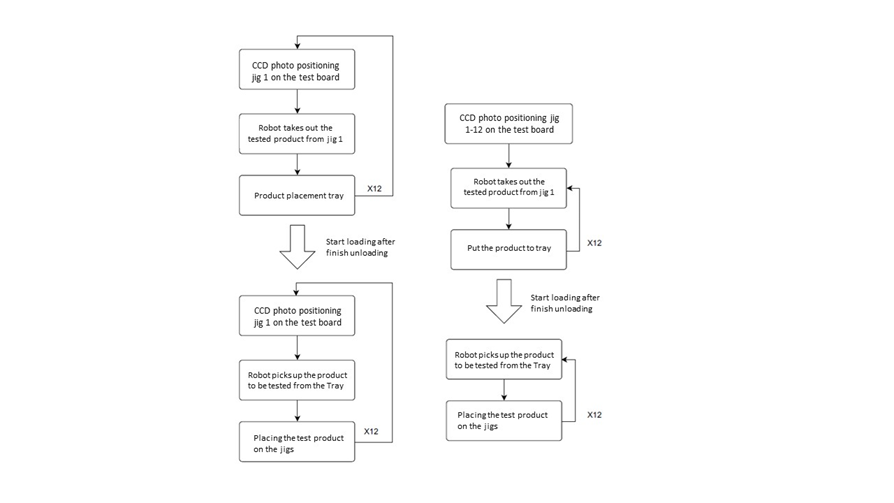
Scenario: Multiple identical jigs need to be loaded and unloaded back and forth, as shown in the flow chart below.
By utilizing the stored vision base of jigs 1 to 12 in conjunction with parameterization, the motion workflow is optimized as depicted in the diagram below:
Other Tips and tricks
- Utilize grayscale color plane
- Set ROI to reduce evaluation range
- Use an appropriate number of pyramid levels
Was this article helpful ?