When and Why Changing Force or Speed for a Robot’s Safety Settings
Updated on 2026 / 08 / 27
Examples are valid for :
TMflow Software version : All versions
TM Robot Hardware version : All versions
Other specific requirements : None
Note that older or newer software versions may have different results.
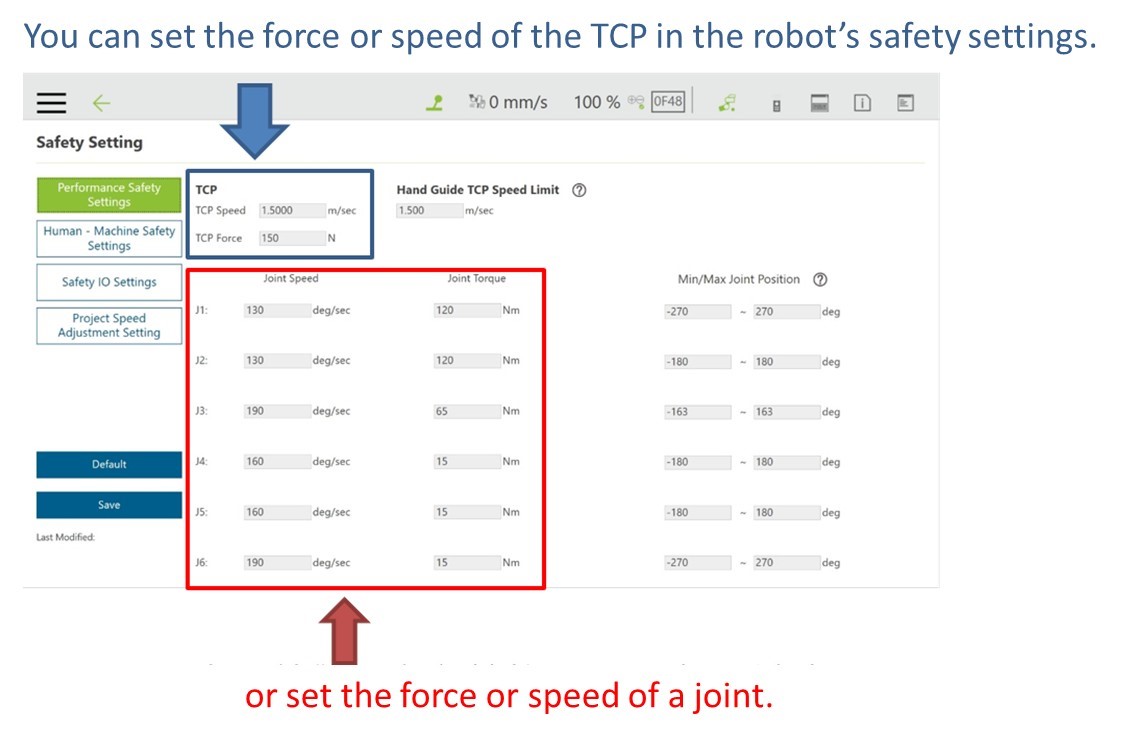
Go to Setting > Safety and Set a Robot's Force or Speed
Scenarios and Purposes
- If your end-of-arm tool is sharp or dangerous device, (e.g., a screwdriver or cutting tool), you can decrease TCP speed to reduce the risk of the robot unjuring human operators.
- If there is a need for a human operator and the robot to work together at a close distance , you can set TCP Force in ways that allow you to effectively check whether the-end-of-arm tool will collide with the operator.
- When the robot is manipulated to apply extra force (such as pushing, pressing, or pulling), some joints apply more force than normal and their torque must be adjusted.
Was this article helpful ?