TM Supported Remote I/O of EtherCAT Slave
Updated on 2026 / 06 / 11
Examples are valid for:
TMflow Software version: 1.76.6300 or above.
TM Robot Hardware version: 1.x/2.x/3.x
Other specific requirements: None
Note that older or newer software versions may have different results.
Supported Main Module | ADLink EPS-6000 | BECKHOFF EK1100 | DELTA R1 - EC5500D0 | Weidmuller UR20-FBC-EC | OMRON NX-ECC201 ECC202 ECC203 |
# Digital Input | 128 | 128 | 128 | 128 | 128 |
# Digital Output | 128 | 128 | 128 | 128 | 128 |
# Analog Input | 2 | 2 | 0 | 0 | 0 |
# Analog Output | 2 | 2 | 0 | 0 | 0 |
Supported Sub Module | DIO / AIO Module | DIO Module | DIO Module | WPA-133491 | NX-ID4342 |
How to Connect a EtherCAT remote I/O ?
- Shutdown TM Robot
- Remove any power
- Connect the power (+24 normally) for the remote I/O device
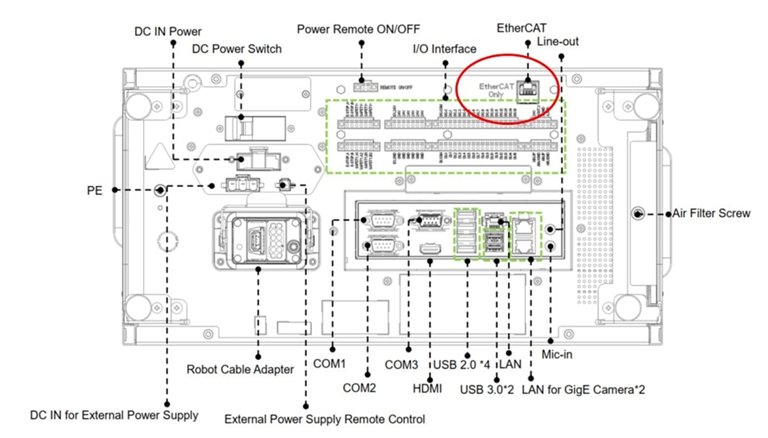
- Connect the remote I/O device to the EtherCAT port on TM controller with an EtherCAT cable
- Power up TM Robot, new I/O should be shown on I/O page in TMflow automatically
- The remote I/O is ready to use
How to Check if an EtherCAT Slave I/O Device is Supported or Not ?
Due to the complexity of EtherCAT I/O protocol, some devices might be compatible with TM robot and others might not.
Please send us an email and prepare the EtherCAT Slave Information file(*.ESI) and EtherCAT Network Information file(*.ENI) to check: TM Robot contact us page
Was this article helpful ?